Comprehensive SEO Tips
Optimizing your website for search engines
SEO stands for "search engine optimization". It involves using the techniques on this page to help your website rank higher in Google, Bing, Yahoo! and Ask. SEO is best done by editing the HTML source code.
As a general rule search engines do not divulge how their algorithms work, and may change them at any time, so SEO involves some guesswork as well as the tried and true methods outlined below.
As a general rule search engines do not divulge how their algorithms work, and may change them at any time, so SEO involves some guesswork as well as the tried and true methods outlined below.
Updates: All sections checked, links checked and updated.
Pagerank | Press | Sitemaps | SE Ratings | Tips | SE Submission | Services
Submitting your website | More details
Your website may not be automatically listed at Google, Bing, Yahoo! and other search engines. It's best to submit your website to make sure you're listed.
Mobile compliance & seo
Having a fast loading mobile friendly website for a better Google listing is important. Check out the sections below for tips and help with Google Tools, Analytics, Pagespeed Insights and the Mobile Friendly Test.
The #1 Ranking Factor
It may seem obvious, but the best way to get a high listing in Google and other search engines is by having well written and relevant text content. The tips below on this page all help a little, however it's the articles related to your product, service or industry that are the single biggest aid in achieving good listings in search engines. Avoid repetitive text, and avoid repeating keywords, from page to page and try to have plenty of unique content on all your webpages.
Title meta tags | Help for editing your title tags
The meta "title" on each page is the most important part of any webpage for getting a good search engine ranking. An effective title will get you a higher listing in the search engines. Try to use a couple of keywords but do not let your title get too long. Keep in mind that the title is also what people will see first when searching and it must make sense for users to click on your link.
Try to keep the meta "title" tag under 60 characters in length as in this example:
<title>The Meta Page Title is Important for Better SEO & SE Ranking</title>
Use a unique title on each page and do not try to stuff too many keywords in the title. It's okay to go over 60 characters, but does not generally help with seo if you do.
Keyword meta tags | Help for editing your keywords
As of this writing, Google and many other search engines do NOT read your keyword meta tags to help list your pages. You will still want to edit your keyword "meta" tags with just a few keywords but you do not need to spend too much time on this. See the sidebar on this page for links to keyword tools.
Site meta description | More details
The meta name="description" is used by Google and other search engines to include a description of each of your webpages in their search results. You should include a unique meta description in each HTML page. The meta description is not generally considered an SEO ranking factor but is important visually for search listings.
At the top of every HTML page you'll find a meta name="description". This area is read by Google and most search engines and is what users see when searching. It is very important to edit this area with a description of your site, service or product. This area can include keywords but should make sense so users will know what your website is about and click your link when searching. If it doesn't make sense users will usually avoid your link.
Image alt tags
As of this writing, Google and most other search engines DO read image "alt" tags. You will want to edit or add these tags to every image on your webpages. In Notepad you can do a "edit" "find" and find "img" to check all of these. Below is a sample of an image with an alt tag included:
<img src="picts/image.gif" alt="Add important key phrases here">
Be sure to edit the "Add important key phrases here" like in the above example with your keyword phrases on your pages. For the best seo, describe what the photo is about even if it doesn't use any keywords.
Note: You'll want to use sentences for the alt tags and not use the same phrase over and over if possible. You may get a lower ranking for spamming keywords.
Fresh content
Search engines do give more SEO weight to updated and current topical articles and website content. Periodically update your website and re-write articles with fresh relevant content. See "TIPS: Page copy" below on this page.
Tip: Periodically change your HTML page meta titles.
Website speed
The loading speed of a website does have an effect on SEO listings, more so for mobile search results. This was once a non-factor, but has been changing in recent years. How much of a factor is unknown and is different for each search engine.
See "Google" section below for more about SEO and page load speeds.
Domain age
The age of a website, or a domain name may play a factor in how well a website lists. As your site ages it may list higher in search engines. Opinions vary on exactly how important site age is for SEO, or if this is actually even a factor on some sites. See Matt Cutts on How does Google determine domain age, and is it important for ranking?
Getting all your website pages listed
The menu.js file included with Allwebco templates is not read by some search engines, so most Allwebco templates include either a "site map" page linked from your "index.html" that links to all other pages, or, in some models a text link path is setup starting from the "index.html". It is best not to remove any text links to the site map page on your template home page.
Option #1. Best linking solution. Add a "sitemap.xml" to your website, submit this file through your Google Tools and Bing Tools accounts, and add a link in your robots.txt. For info on creating a sitemap so all pages on your website will be indexed by search engines see Sitemaps.org and Freesitemapgenerator.com.
See next section below "Using a sitemap.xml".
Option #2. Best linking solution. Add visible links on your index.html to either your site map page or to all your other pages. See the add links support page. See also "Normal page links" below.
Option #3. If your template does not include a "site_map.htm". Make a copy of any template page, for example copy the about page. Make this page a sitemap page. Add a link to every page on your site on this page, then either submit this page to Google separately when you submit your domain, or add one link on your index.html to this page.
Option #4. Best linking solution. Check the Webmaster Tools at Google or Bing for adding a sitemap to your website:
Option #5. Linking solution. Add images with links or links to all images on your "index.html" or website homepage. See the adding images to a page support page for details.
Mobile sub-sites: If your website includes a mobile website inside a "mobile" folder be sure you have a link on your full or "top level" homepage linking to the mobile homepage. See also mobile sub sites.
Using a sitemap.xml: For info on creating a sitemap so all pages on your website will be indexed by search engines check out Sitemaps.org and also Free XML-Sitemaps and Freesitemapgenerator.com. See also on this site Submitting Your Website to Search Engines for more on sitemaps.
Once you have created a sitemap.xml you will want to add it in your Google tools and Bing Webmaster tools accounts, or ping your sitemap. Optionally you can tell search engines where your sitemap is with a "robots.txt" file. Click here for more details on using sitemap xml files.
What Allwebco uses: We have been using the xml-sitemaps.com $19.00 advanced PHP sitemap generator on our website for many years and have had no problems of any kind. You can optionally generate sitemaps for small websites for free on their website as well.
Google Tools and Analytics: Both Google and Bing tools are an important application to setup and add to your website. See Google Site Verification and Analytics Setup Steps for a step by step tutorial to verify your website and set up an Analytics account.
Google Mobile Friendly Test: This tool checks to see how well a website is mobile configured. Passing this test will help your website list higher on smartphone and other mobile searches. Generally passing this test will not help desktop or tablet SEO. See Passing the Google Mobile Friendly Test.
Google Pagespeed Insights: Another website checker tool, Google Pagespeed Insights, checks the speed of your website and can be very handy for finding specific reasons why your site is not passing the mobile friendly test. Although speed is a (small) ranking factor, in many cases reducing the speed of your website load times will not have a profound effect on how well you rank in searches. The goal is to have the highest user experience grade possible at GPI without compromising the functionality of your site.
To prove this point and see just how little page speed really affects your search ranking (and many SEO experts will disagree on this point), try searching at Google for some keywords related to your business. In most cases one or more of the top results will be some big lunky website that loads like a pig, and if you view their code source you'll see tons of lines of code in the head section alone.
Having a fast loading website is desirable for a number of reasons, but it's not the only way, or even the best way to get high rankings in Google. Mobile ranking is not set on a scale. If your site is more mobile compliant, or loads faster, than your competitors, it will not necessarily improve your position. If speed was the only consideration, websites with one paragraph of massively sized text with no images would always be the top listing. The only requirement is to have your website graded as "Mobile Friendly" in the Google Mobile Friendly Test. After that, page content and backlinks are needed to give your website a good ranking.
GPI grade results: If you check your site, you may see low grades at the top and a high grade like 90/100 or better for user experience. This indicates that even this checker understands that websites may need a number of images, videos or dynamic effects to showcase a specific product or service and "stripping" it down does not make it a better website.
See Using site speed in web search ranking at Google Webmaster Central Blog
SEO Analyzer
Another often overlooked tool is the Bing SEO Analyzer. Checking your site using this application can help you find areas that may be lowering your SEO ranking and offers tips so you can use the best practices when optimizing.
Normal page links | Help for adding page links
Text links on your home page are also important. What you may want to do, in addition to having plenty of copy on your homepage is also add normal text links to your pages as well with keywords in the link name. Here's an example:
<a href="about.htm">Link name with keywords</a>
Add the above link to the main body of your index.html or any of your other pages. Do not overuse your keywords and try to also use related phrases.
The home page
At one time Google placed the most relevance on the website home page. This is no longer the case. Recent trends indicate that Google now looks more at the website as a whole, so your homepage may not always list at the top in keyword searches related to your website. This indicates that it's not necessary to stuff your homepage full of text and keywords, instead you should concentrate your efforts on making your homepage as user friendly as possible.
Page text copy
If you can, try to have plenty of text on at least one page at your site with a long article about your service or product. Include (only a few) words and phrases that might be searched for often (do not *keyword stuff*, Google is waaay too smart). This can be a great help with your rankings. Be sure to link this page from your homepage or site map with a text link or image link. If you do not the page may not be found.
You can optimize your site using every tip on this page, but these techniques are all small fish and help rankings in small ways only. To rank high there are two things you need plenty of. Good articles related to your product or service and backlinks to your website (links on other websites that link to your website). And with backlinks, it's not just a plain text link that will boost your ranking, to get real benefits from your backlinks you need the links included as part of an article or at the least, a paragraph on the linkers website that relates to your business.
At the time of this writing page copy and articles are probably the best SEO you can do. Write some helpful articles related to your business and include links to the new pages on your site map and/or your homepage. Try to not overuse your keywords so Google can view your articles as useful information.
Consider what search engines want: The only goal that Google has (other than controlling the universe) is to provide relevant content to people that search on their site so that they'll keep coming back.
TIPS: <H1> or heading tags | More Details
Many on-line articles indicate that "headings" tags may improve your webpage rankings at Google. <H1> tags can be added to any Allwebco template. Add with caution, use only a single <H1> heading tag per page otherwise it may be seen as spamming by Google. You can use the <H2> tag about 5 times per page.
You can use sub-headings <H3> and <H4> tags multiple times on each webpage.
Code Examples:
<h1 style="margin: 0px;" class="title">This is a Heading</h1>
<h2 style="margin: 0px;" class="subtitle">This is a Sub Heading</h2>
Renders as:
This is a Heading
This is a Sub Heading
The above H1 and H2 tags are css styled (colored, with a large font size) because we have included ".title" and ".smalltitle" classes in our global .css file. See the following.
Warning: Do not replace the first <title> tag in the header of the webpage with <H1> tags. The header <title> is a meta tag used for SEO. See "Title Tags" above.
TIPS: Using different titles | Help for editing title tags
For better results, try to have different titles on each of your pages. Use a couple of keywords for each title but do not let them get too long. Keep in mind that the title is also what people will see first when searching and it must make sense for users to click on your link.
TIPS: Change titles and content | Help for editing title tags
If you can, change your page copy at least once a month and also change your title tags. Google and some other search engines give your website a better ranking if it is perceived to be current information.
TIPS: Page errors
Although search engines do not actually check a website for errors, errors can slow down your website load speed and effect your SE ranking. You should check your pages for errors after any major updates. See the Finding and Fixing Webpage Errors support page for info on finding webpage errors.
TIPS: Local searches
Add local towns to your page copy, titles and "alt" tags so there is less competition for your business. Keep in mind that people may be searching for your product by town or city. This will cut the competition down to your area only if you add every local town, county, city and state to either your page copy, titles or your "alt" tags. This can be very effective. You may want to get out a map and find every town in your area. Perhaps even create a page just listing the towns you service and call it your "service area" page. Be sure to link this page from your homepage with a text link or site map as described above. If you do not the page may not be found.
Optionally, if you do not mind having your physical location and phone number listed on-line, you can setup a Google Plus business account and get your business listed in Google map searches. See: Google Business.
TIPS: Link building
Reciprocal vs One Way Link Building: Link building is a critical technique to achieve top 10 rankings on the major search engines. The search engines job is to provide the searchers with the most relevant information for the search term used. To effectively provide relevant results, the search engine uses both "on-page" and "off-page" factors. Having a well-balanced on-going link building campaign is important. However, the emphasis should be on one-way links to your website. The major search engines are discounting the reciprocal links and almost cancelling them out. One great way to acquire one way links fast is through the use of paid press releases. See the PR Web press release newswire website for more info.
Page Rank
Pagerank is a backlink analysis algorithm used by Google, and possibly Bing and other search engines, to give more importance to a website in keyword search results. The more links that lead to your website the higher your Page Rank.
TIPS: Distributing a Press Release
Using a press release distribution service is an excellent way to disseminate news about your business. A press release is not only for large companies, but for any type or size of website or business. Click here for some tips on following the proper format for writing a press release. If you have the time to write a press release, it is a very cost effective way to build links, and enhance your site visibility. Ensure you do have something newsworthy to write about to maintain your credibility. You may want to search Google News for press releases related to your product or service to see what may be newsworthy.

Check out 24-7 Press Release for tips, news, submission services and other useful information if you are interested in distributing a press release.
TIPS: Don't forget Yahoo! and MSN Bing Search:
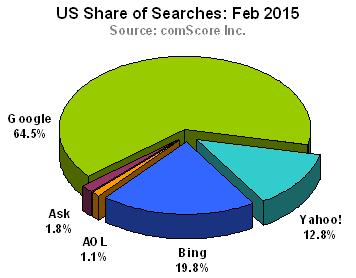
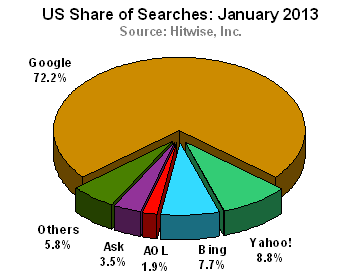
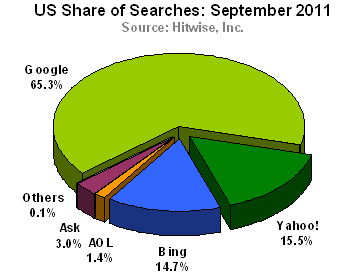
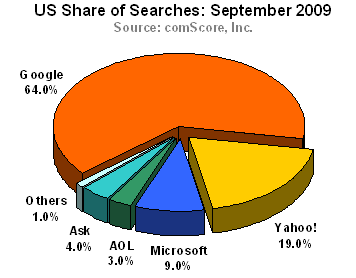
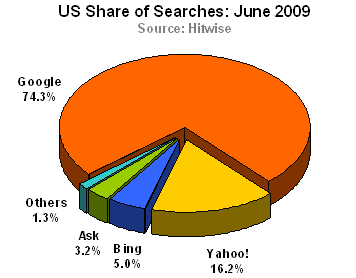
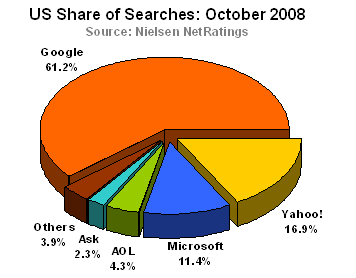
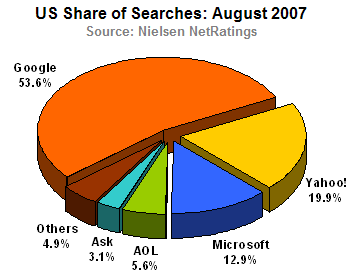
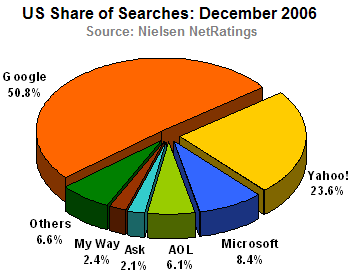
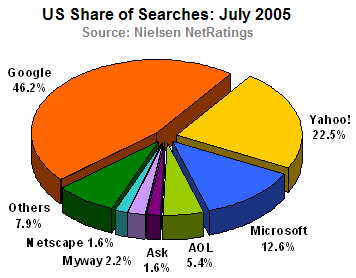
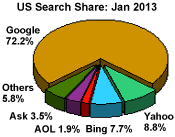
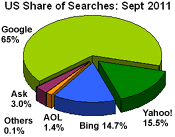
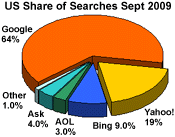
Although Google has the lion's share of searches, Yahoo!, MSN Bing Search, AOL and Ask still receive millions of searches each day. Be sure to check your site listings in these search engines and check out optimizing information for each. See sidebar on this page for optimizing links.
Professional services:
There are many optimization services available to help you achieve higher search engine ranking. You can try some searches at Google for "website optimization services".
Search engine search share
Below are yearly pie charts that show the most popular search engines. Rankings come from Nielsen NetRatings, ComScore, Inc., Hitwise and Net Marketshare websites.



Related Topics:
Submitting your site to the search engines
Editing your title and meta tags
Related Websites:
greatagencies.com
META Tag Analyzer
Bing SEO Analyzer
Google Webmaster

related sites...
webmaster tools...
sitemaps...
keyword tools...
optimizing help...


SEO Friendly Websites
Small business responsive design web templates for mobile, tablet, surface and desktop compliance.
Responsive Photography
HTML mobile compliant web layouts for professional photographers and artists.
Build a Business Website
Step by step instructions and tips for building a small business web site.
SEO Optimized Site Layouts
Downloadable HTML CSS website templates for any web building project.